> ## Documentation Index
> Fetch the complete documentation index at: https://cometchat-22654f5b-docs-skills-v5-temp.mintlify.site/llms.txt
> Use this file to discover all available pages before exploring further.
# Incoming Call
> Display and handle incoming voice and video calls with CometChatIncomingCall component in React Native UI Kit, providing options to accept or decline.
| Field | Value |
| -------------- | -------------------------------------------------------------------------------------------------------------------------------------- |
| Component | `CometChatIncomingCall` |
| Package | `@cometchat/chat-uikit-react-native` |
| Import | `import { CometChatIncomingCall } from "@cometchat/chat-uikit-react-native";` |
| Purpose | Visual representation for incoming voice and video calls with accept/decline options. |
| Data props | `call` |
| Primary output | `onAccept(call)` — user accepted the incoming call |
| Other actions | `onDecline` · `onError` — [details](#actions-and-events) |
| View slots | `ItemView` · `LeadingView` · `TitleView` · `SubtitleView` · `TrailingView` — [details](#custom-view-slots) |
| UI events | `ccCallRejected` · `ccCallAccepted` · `ccCallEnded` · `ccCallFailed` |
| Styling | `style` prop — [tokens and overrides](#styling) |
| Prerequisites | `CometChatUIKit.init()` completed and a user logged in · `@cometchat/calls-sdk-react-native` installed (**not** a kit peer dependency) |
## Where It Fits
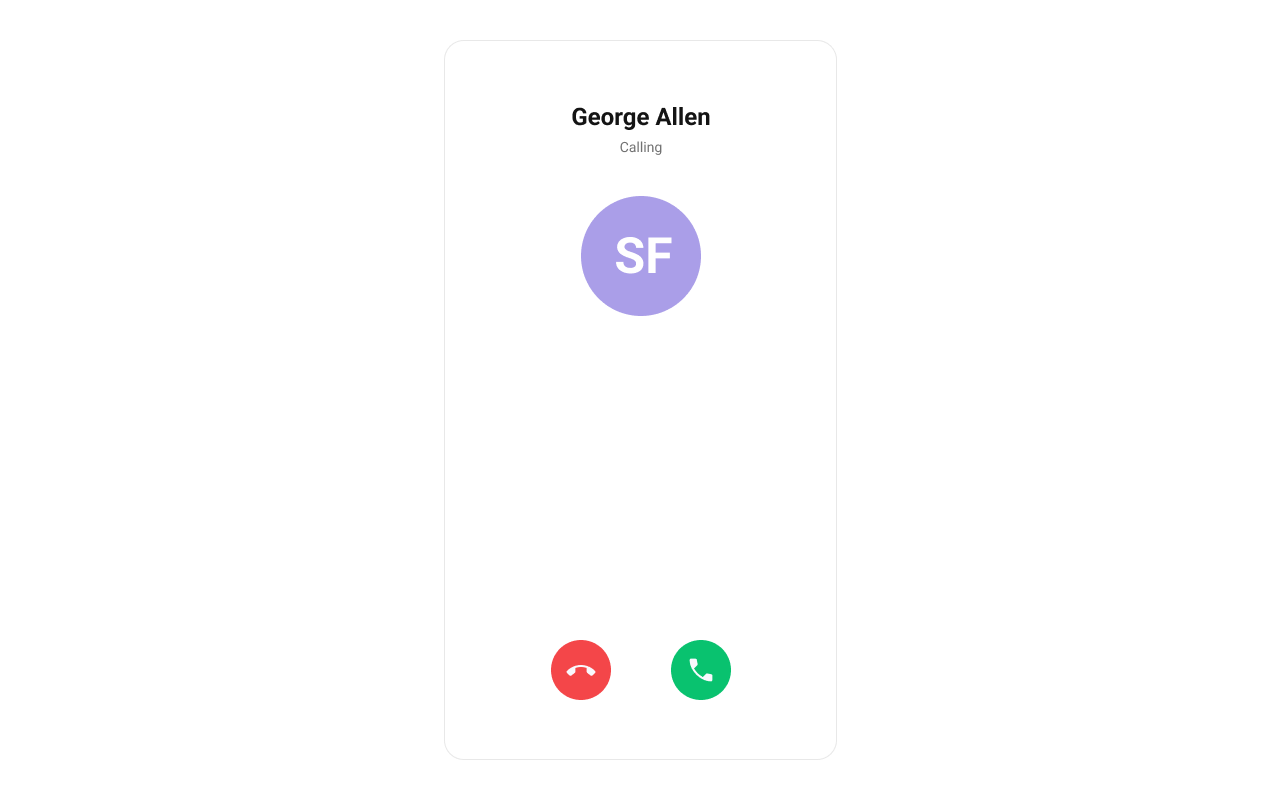
`CometChatIncomingCall` is a [Component](/ui-kit/react-native/components-overview#components) that serves as a visual representation when the user receives an incoming call, such as a voice call or video call, providing options to answer or decline the call.
 ***
## Minimal Render
```tsx lines theme={null}
import { CometChat } from "@cometchat/chat-sdk-react-native";
import { CometChatIncomingCall } from "@cometchat/chat-uikit-react-native";
import { useState, useRef, useEffect } from "react";
function IncomingCallDemo() {
const incomingCall = useRef(null);
const [callReceived, setCallReceived] = useState(false);
const listenerId = "INCOMING_CALL_LISTENER";
useEffect(() => {
CometChat.addCallListener(
listenerId,
new CometChat.CallListener({
onIncomingCallReceived: (call) => {
incomingCall.current = call;
setCallReceived(true);
},
onIncomingCallCancelled: (call) => {
incomingCall.current = null;
setCallReceived(false);
},
})
);
return () => {
CometChat.removeCallListener(listenerId);
};
}, []);
return (
<>
{callReceived && incomingCall.current && (
setCallReceived(false)}
/>
)}
);
}
```
***
## Actions and Events
### Callback Props
#### onAccept
Fires when the accept button is pressed.
```tsx lines theme={null}
onAccept?: (call: CometChat.BaseMessage) => void
```
```tsx lines theme={null}
import { CometChatIncomingCall } from "@cometchat/chat-uikit-react-native";
import { CometChat } from "@cometchat/chat-sdk-react-native";
function IncomingCallWithAccept() {
const handleAccept = (call: CometChat.BaseMessage) => {
console.log("Call accepted:", call);
};
return (
setCallReceived(false)}
/>
);
}
```
#### onDecline
Fires when the decline button is pressed.
```tsx lines theme={null}
onDecline?: (call: CometChat.BaseMessage) => void
```
```tsx lines theme={null}
import { CometChatIncomingCall } from "@cometchat/chat-uikit-react-native";
function IncomingCallWithDecline() {
const handleDecline = (call) => {
console.log("Call declined");
setCallReceived(false);
};
return (
);
}
```
#### onError
Fires on internal errors (network failure, auth issue, SDK exception).
```tsx lines theme={null}
onError?: (error: CometChat.CometChatException) => void
```
```tsx lines theme={null}
import { CometChatIncomingCall } from "@cometchat/chat-uikit-react-native";
import { CometChat } from "@cometchat/chat-sdk-react-native";
function IncomingCallWithError() {
return (
setCallReceived(false)}
onError={(error: CometChat.CometChatException) => {
console.error("IncomingCall error:", error);
}}
/>
);
}
```
### Global UI Events
`CometChatUIEventHandler` emits events subscribable from anywhere in the application. Add listeners and remove them on cleanup.
| Event | Fires when | Payload |
| ---------------- | ------------------------------------------ | ---------- |
| `ccCallRejected` | Initiated call is rejected by the receiver | `{ call }` |
| `ccCallAccepted` | Initiated call is accepted by the receiver | `{ call }` |
| `ccCallEnded` | Initiated call successfully ends | `{ call }` |
| `ccCallFailed` | Error occurs during the initiated call | `{ call }` |
When to use: sync external UI with call state changes. For example, update a call status indicator, show notifications, or log call events.
```tsx lines theme={null}
import { useEffect } from "react";
import { CometChatUIEventHandler } from "@cometchat/chat-uikit-react-native";
function useIncomingCallEvents() {
useEffect(() => {
const listenerId = "INCOMING_CALL_EVENTS_" + Date.now();
CometChatUIEventHandler.addCallListener(listenerId, {
ccCallRejected: ({ call }) => {
console.log("Call rejected:", call);
},
ccCallAccepted: ({ call }) => {
console.log("Call accepted:", call);
},
ccCallEnded: ({ call }) => {
console.log("Call ended:", call);
},
ccCallFailed: ({ call }) => {
console.log("Call failed:", call);
},
});
return () => {
CometChatUIEventHandler.removeCallListener(listenerId);
};
}, []);
}
```
***
## Custom View Slots
Each slot replaces a section of the default UI. Slots that accept a call parameter receive the call object for customization.
| Slot | Signature | Replaces |
| -------------- | ----------------------- | ------------------------- |
| `ItemView` | `(call) => JSX.Element` | Entire incoming call card |
| `LeadingView` | `(call) => JSX.Element` | Avatar / left section |
| `TitleView` | `(call) => JSX.Element` | Caller name / title text |
| `SubtitleView` | `(call) => JSX.Element` | Call type / status text |
| `TrailingView` | `(call) => JSX.Element` | Accept/decline buttons |
### ItemView
Custom view for the entire incoming call card.
```tsx lines theme={null}
ItemView?: (call: CometChat.Call | CometChat.CustomMessage) => JSX.Element
```
```tsx lines theme={null}
import { CometChatIncomingCall } from "@cometchat/chat-uikit-react-native";
import { CometChat } from "@cometchat/chat-sdk-react-native";
import { View, Text } from "react-native";
function ItemViewDemo() {
const getItemView = (call: CometChat.Call | CometChat.CustomMessage) => {
return (
Incoming Call
);
};
return (
setCallReceived(false)}
ItemView={getItemView}
/>
);
}
```
### LeadingView
Custom view for the avatar / left section.
```tsx lines theme={null}
LeadingView?: (call: CometChat.Call | CometChat.CustomMessage) => JSX.Element
```
```tsx lines theme={null}
import { CometChatIncomingCall } from "@cometchat/chat-uikit-react-native";
import { CometChat } from "@cometchat/chat-sdk-react-native";
import { View, Text } from "react-native";
function LeadingViewDemo() {
const getLeadingView = (call: CometChat.Call | CometChat.CustomMessage) => {
const caller = call.getCallInitiator();
return (
{caller.getName().charAt(0)}
);
};
return (
setCallReceived(false)}
LeadingView={getLeadingView}
/>
);
}
```
### SubtitleView
Custom view for the call type / status text.
```tsx lines theme={null}
SubtitleView?: (call: CometChat.Call | CometChat.CustomMessage) => JSX.Element
```
```tsx lines theme={null}
import { CometChatIncomingCall } from "@cometchat/chat-uikit-react-native";
import { CometChat } from "@cometchat/chat-sdk-react-native";
import { Text } from "react-native";
function SubtitleViewDemo() {
const getSubtitleView = (call: CometChat.Call | CometChat.CustomMessage) => {
const callType = call.getType() === "audio" ? "Voice Call" : "Video Call";
return {callType};
};
return (
setCallReceived(false)}
SubtitleView={getSubtitleView}
/>
);
}
```
***
## Styling
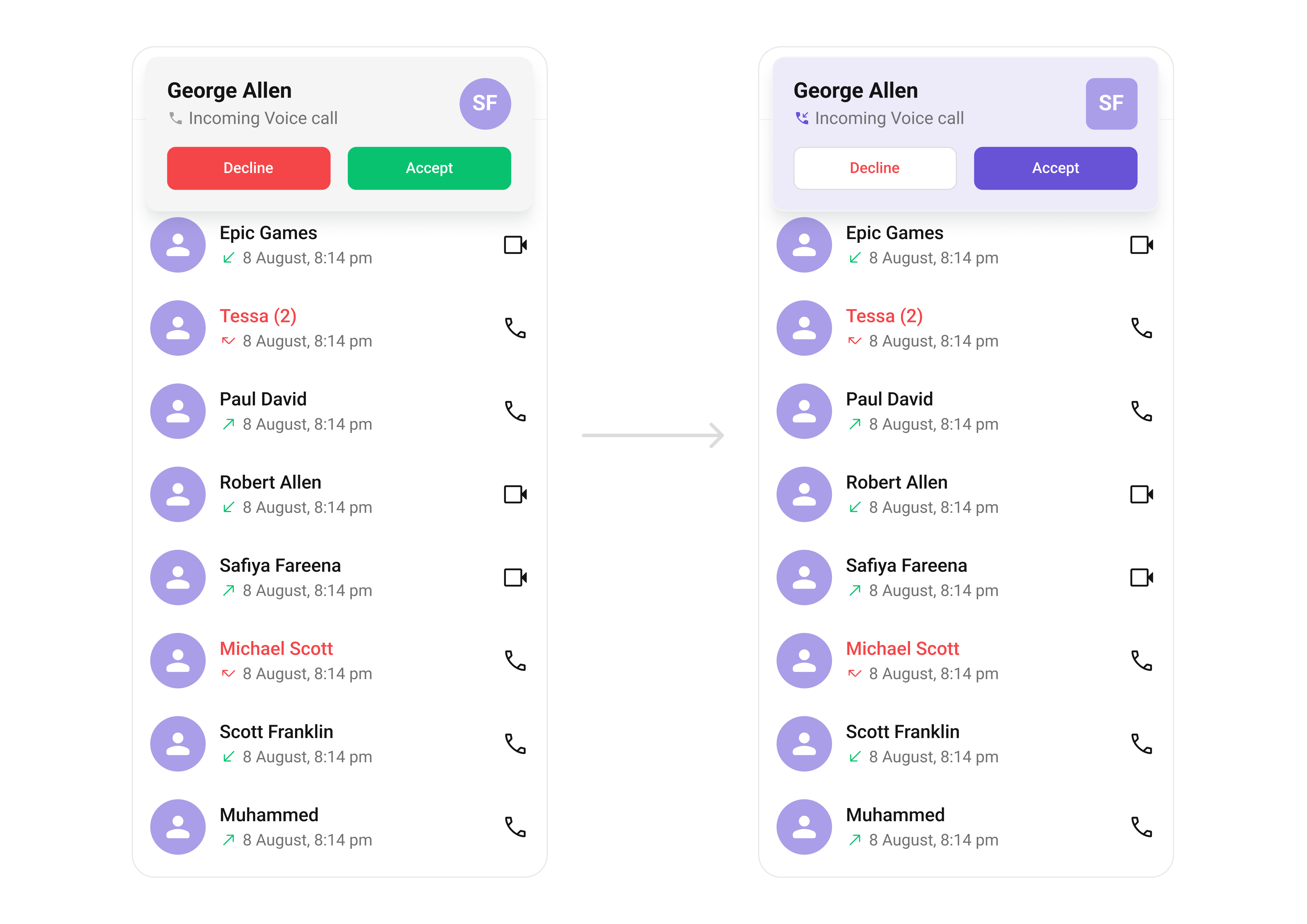
Using Style you can customize the look and feel of the component in your app. Pass a styling object as a prop to the `CometChatIncomingCall` component.
***
## Minimal Render
```tsx lines theme={null}
import { CometChat } from "@cometchat/chat-sdk-react-native";
import { CometChatIncomingCall } from "@cometchat/chat-uikit-react-native";
import { useState, useRef, useEffect } from "react";
function IncomingCallDemo() {
const incomingCall = useRef(null);
const [callReceived, setCallReceived] = useState(false);
const listenerId = "INCOMING_CALL_LISTENER";
useEffect(() => {
CometChat.addCallListener(
listenerId,
new CometChat.CallListener({
onIncomingCallReceived: (call) => {
incomingCall.current = call;
setCallReceived(true);
},
onIncomingCallCancelled: (call) => {
incomingCall.current = null;
setCallReceived(false);
},
})
);
return () => {
CometChat.removeCallListener(listenerId);
};
}, []);
return (
<>
{callReceived && incomingCall.current && (
setCallReceived(false)}
/>
)}
);
}
```
***
## Actions and Events
### Callback Props
#### onAccept
Fires when the accept button is pressed.
```tsx lines theme={null}
onAccept?: (call: CometChat.BaseMessage) => void
```
```tsx lines theme={null}
import { CometChatIncomingCall } from "@cometchat/chat-uikit-react-native";
import { CometChat } from "@cometchat/chat-sdk-react-native";
function IncomingCallWithAccept() {
const handleAccept = (call: CometChat.BaseMessage) => {
console.log("Call accepted:", call);
};
return (
setCallReceived(false)}
/>
);
}
```
#### onDecline
Fires when the decline button is pressed.
```tsx lines theme={null}
onDecline?: (call: CometChat.BaseMessage) => void
```
```tsx lines theme={null}
import { CometChatIncomingCall } from "@cometchat/chat-uikit-react-native";
function IncomingCallWithDecline() {
const handleDecline = (call) => {
console.log("Call declined");
setCallReceived(false);
};
return (
);
}
```
#### onError
Fires on internal errors (network failure, auth issue, SDK exception).
```tsx lines theme={null}
onError?: (error: CometChat.CometChatException) => void
```
```tsx lines theme={null}
import { CometChatIncomingCall } from "@cometchat/chat-uikit-react-native";
import { CometChat } from "@cometchat/chat-sdk-react-native";
function IncomingCallWithError() {
return (
setCallReceived(false)}
onError={(error: CometChat.CometChatException) => {
console.error("IncomingCall error:", error);
}}
/>
);
}
```
### Global UI Events
`CometChatUIEventHandler` emits events subscribable from anywhere in the application. Add listeners and remove them on cleanup.
| Event | Fires when | Payload |
| ---------------- | ------------------------------------------ | ---------- |
| `ccCallRejected` | Initiated call is rejected by the receiver | `{ call }` |
| `ccCallAccepted` | Initiated call is accepted by the receiver | `{ call }` |
| `ccCallEnded` | Initiated call successfully ends | `{ call }` |
| `ccCallFailed` | Error occurs during the initiated call | `{ call }` |
When to use: sync external UI with call state changes. For example, update a call status indicator, show notifications, or log call events.
```tsx lines theme={null}
import { useEffect } from "react";
import { CometChatUIEventHandler } from "@cometchat/chat-uikit-react-native";
function useIncomingCallEvents() {
useEffect(() => {
const listenerId = "INCOMING_CALL_EVENTS_" + Date.now();
CometChatUIEventHandler.addCallListener(listenerId, {
ccCallRejected: ({ call }) => {
console.log("Call rejected:", call);
},
ccCallAccepted: ({ call }) => {
console.log("Call accepted:", call);
},
ccCallEnded: ({ call }) => {
console.log("Call ended:", call);
},
ccCallFailed: ({ call }) => {
console.log("Call failed:", call);
},
});
return () => {
CometChatUIEventHandler.removeCallListener(listenerId);
};
}, []);
}
```
***
## Custom View Slots
Each slot replaces a section of the default UI. Slots that accept a call parameter receive the call object for customization.
| Slot | Signature | Replaces |
| -------------- | ----------------------- | ------------------------- |
| `ItemView` | `(call) => JSX.Element` | Entire incoming call card |
| `LeadingView` | `(call) => JSX.Element` | Avatar / left section |
| `TitleView` | `(call) => JSX.Element` | Caller name / title text |
| `SubtitleView` | `(call) => JSX.Element` | Call type / status text |
| `TrailingView` | `(call) => JSX.Element` | Accept/decline buttons |
### ItemView
Custom view for the entire incoming call card.
```tsx lines theme={null}
ItemView?: (call: CometChat.Call | CometChat.CustomMessage) => JSX.Element
```
```tsx lines theme={null}
import { CometChatIncomingCall } from "@cometchat/chat-uikit-react-native";
import { CometChat } from "@cometchat/chat-sdk-react-native";
import { View, Text } from "react-native";
function ItemViewDemo() {
const getItemView = (call: CometChat.Call | CometChat.CustomMessage) => {
return (
Incoming Call
);
};
return (
setCallReceived(false)}
ItemView={getItemView}
/>
);
}
```
### LeadingView
Custom view for the avatar / left section.
```tsx lines theme={null}
LeadingView?: (call: CometChat.Call | CometChat.CustomMessage) => JSX.Element
```
```tsx lines theme={null}
import { CometChatIncomingCall } from "@cometchat/chat-uikit-react-native";
import { CometChat } from "@cometchat/chat-sdk-react-native";
import { View, Text } from "react-native";
function LeadingViewDemo() {
const getLeadingView = (call: CometChat.Call | CometChat.CustomMessage) => {
const caller = call.getCallInitiator();
return (
{caller.getName().charAt(0)}
);
};
return (
setCallReceived(false)}
LeadingView={getLeadingView}
/>
);
}
```
### SubtitleView
Custom view for the call type / status text.
```tsx lines theme={null}
SubtitleView?: (call: CometChat.Call | CometChat.CustomMessage) => JSX.Element
```
```tsx lines theme={null}
import { CometChatIncomingCall } from "@cometchat/chat-uikit-react-native";
import { CometChat } from "@cometchat/chat-sdk-react-native";
import { Text } from "react-native";
function SubtitleViewDemo() {
const getSubtitleView = (call: CometChat.Call | CometChat.CustomMessage) => {
const callType = call.getType() === "audio" ? "Voice Call" : "Video Call";
return {callType};
};
return (
setCallReceived(false)}
SubtitleView={getSubtitleView}
/>
);
}
```
***
## Styling
Using Style you can customize the look and feel of the component in your app. Pass a styling object as a prop to the `CometChatIncomingCall` component.
 ```tsx lines theme={null}
import { CometChatIncomingCall, useTheme } from "@cometchat/chat-uikit-react-native";
function StylingDemo() {
const theme = useTheme();
return (
setCallReceived(false)}
style={{
containerStyle: {
backgroundColor: theme.color.extendedPrimary100,
},
avatarStyle: {
containerStyle: {
backgroundColor: theme.color.extendedPrimary500,
borderRadius: 8,
},
imageStyle: {
borderRadius: 8,
},
},
declineCallButtonStyle: {
backgroundColor: theme.color.staticWhite,
},
declineCallTextStyle: {
color: theme.color.error,
},
acceptCallButtonStyle: {
backgroundColor: theme.color.primary,
},
}}
/>
);
}
```
### Visibility Props
| Property | Description | Code |
| ---------------------- | ------------------------------------------ | -------------------------------- |
| `disableSoundForCalls` | Disable/enable the sound of incoming calls | `disableSoundForCalls?: boolean` |
| `customSoundForCalls` | Set custom sound for incoming calls | `customSoundForCalls?: string` |
***
## Next Steps
Display and manage outgoing calls
Add voice and video call buttons to your UI
Overview of all calling features
Customize the appearance of UI Kit components
```tsx lines theme={null}
import { CometChatIncomingCall, useTheme } from "@cometchat/chat-uikit-react-native";
function StylingDemo() {
const theme = useTheme();
return (
setCallReceived(false)}
style={{
containerStyle: {
backgroundColor: theme.color.extendedPrimary100,
},
avatarStyle: {
containerStyle: {
backgroundColor: theme.color.extendedPrimary500,
borderRadius: 8,
},
imageStyle: {
borderRadius: 8,
},
},
declineCallButtonStyle: {
backgroundColor: theme.color.staticWhite,
},
declineCallTextStyle: {
color: theme.color.error,
},
acceptCallButtonStyle: {
backgroundColor: theme.color.primary,
},
}}
/>
);
}
```
### Visibility Props
| Property | Description | Code |
| ---------------------- | ------------------------------------------ | -------------------------------- |
| `disableSoundForCalls` | Disable/enable the sound of incoming calls | `disableSoundForCalls?: boolean` |
| `customSoundForCalls` | Set custom sound for incoming calls | `customSoundForCalls?: string` |
***
## Next Steps
Display and manage outgoing calls
Add voice and video call buttons to your UI
Overview of all calling features
Customize the appearance of UI Kit components